Easy Methods to Import MSG to Zoho Mail Account in Bulk?


User Query: “I’ve got a lot of old Outlook emails saved as .msg files on my computer. Now I’ve moved to Zoho Mail, and I’m stuck because I don’t know how to get those emails into my new account. Is there any simple way to do this?”
Summary: If you’ve switched from Outlook to Zoho Mail, this can get confusing fast. Those .msg files are just there, and you can’t open or use them properly in Zoho. A lot of people run into the same issue after changing email services. In this blog, we’ll go through some easy ways to import MSG to Zoho Mail without losing your emails. Additionally, we will introduce the MacSonik MSG Converter Tool to make the process easy.
Why Import Outlook MSG Files into Zoho Mail?
- Many users move to Zoho Mail for a cleaner inbox and better overall experience.
- Zoho Mail lets you access emails anywhere, which is easier than opening local MSG files.
- Managing emails inside Zoho is simpler compared to handling scattered MSG files on a computer.
- It helps keep all work and personal emails together.
- MSG files are not easy to share, but Zoho Mail makes sharing much simpler.
- Users prefer Zoho for its features, so moving old emails there just makes sense.
- Having everything in Zoho avoids the risk of losing important MSG files over time.
Quick Answer: Migrate MSG Files to Zoho Mail
You can move MSG files to Zoho Mail using Outlook with IMAP, but it’s slow, and you can only do one email at a time. If you have a lot of files, an MSG Converter Tool makes it easier by moving everything together without much effort.
Manual Method to Import MSG to Zoho Mail Account Manually
There isn’t a direct option to upload MSG files into Zoho Mail, so you have to do it in a simple workaround.
Steps to Import MSG Emails to Zoho Mail
- Open the MSG file using Microsoft Outlook on your system.
- Drag and drop the email into your Outlook inbox or any folder.
- Make sure your Zoho Mail account is added to Outlook (via IMAP).
- Now, drag that email from Outlook to your Zoho Mail folder.
- Let it sync so the email shows up in your Zoho account.
Limitations
- It only works if you have Microsoft Outlook installed and properly set up.
- You need to configure Zoho Mail in Outlook, which can take extra time.
- There is a chance some emails may not sync properly.
- Attachments or formatting may not always appear the same after moving.
- It depends on internet sync, which can sometimes delay the process.
- Not a good option if you want a quick or bulk import solution.
Professional Method to Import MSG to Zoho Mail Account
If you’re dealing with many MSG files and don’t want to move them one by one. The MSG Converter Tool makes the whole process very easy. This smart utility does not break the email structure, formatting, or any of the details inside. You don’t need to be tech-savvy to figure it out — load your files, pick your destination format, and start the import. Also, this tool can be used to import MSG to Gmail and other clients. In addition, it is used to convert MSG to OFT and many other formats.
Steps to Open MSG Files in Zoho Mail
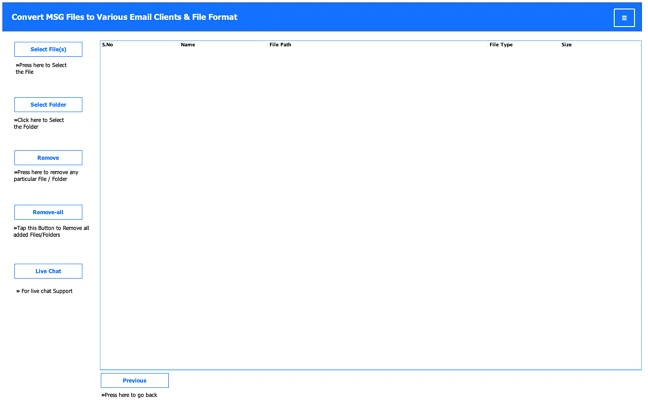
- Download the MSG Converter Tool.
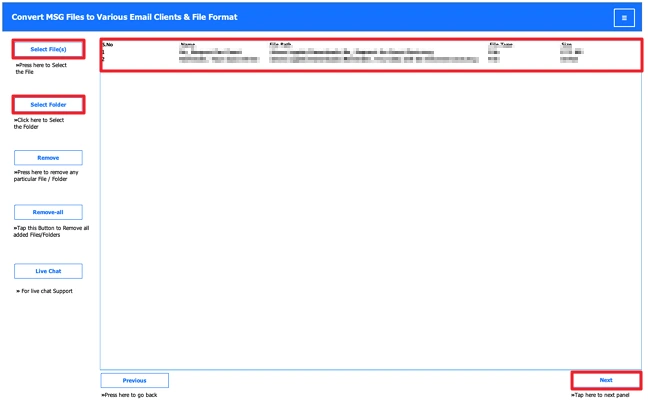
- Then, add the MSG files and click Next.
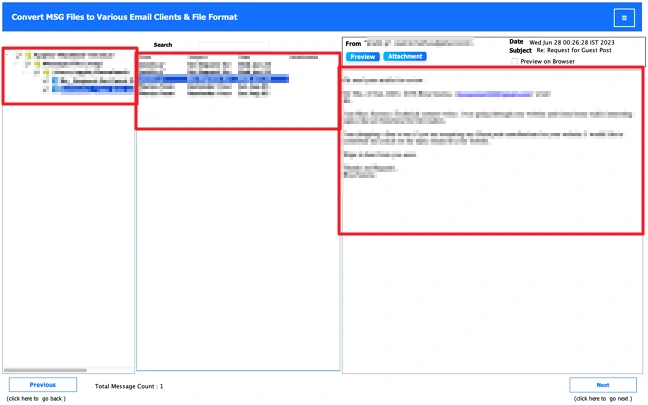
- Further, preview and select files, and click Next.
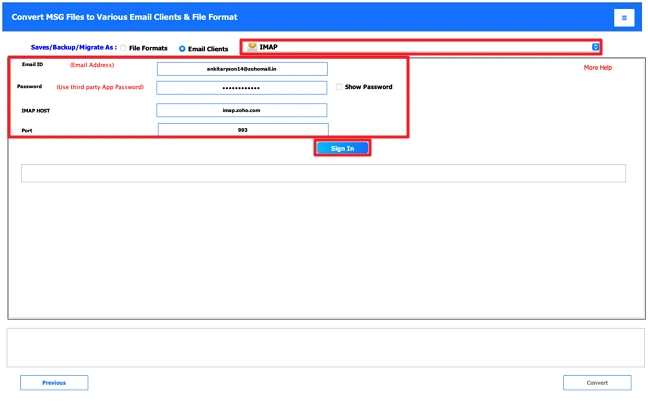
- Choose IMAP and log in with Zoho credentials.
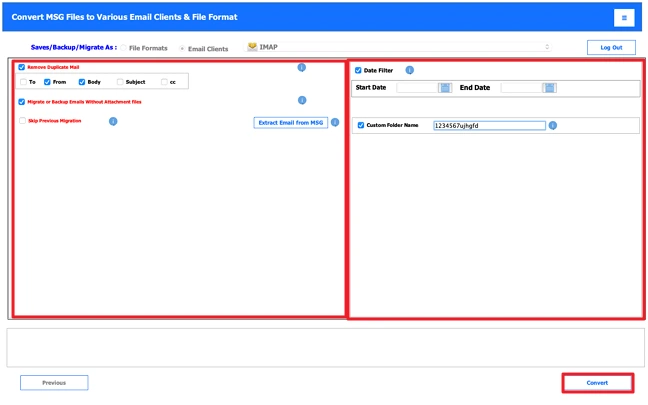
- Lastly, apply filters and press the Convert button.
Conclusion
Moving old Outlook emails to Zoho Mail is actually pretty simple. If you still use Outlook, you can try the manual IMAP way to import MSG to Zoho Mail. It works, but takes some time. If your emails are saved as MSG files, using a converter tool is easier. You just add the files and move them in a few steps. Before you start, keep a backup of your emails.
Frequently Asked Questions
Ans: Many users move to Zoho Mail to keep all emails in one place. MSG files stay on the system and are harder to manage or access.
Ans: The manual method does not offer this option. With the MSG Converter Tool, you can use filters to manage such things during the process.
Ans: Yes, attachments can be moved along with emails. The MSG Converter Tool keeps email content and attachments as they are.
Ans: For a few files, the manual method can work. For multiple files, the MSG Converter Tool is easier since it handles everything in one go.
Related Post
