A Step-by-Step Guide to Convert OST to DOC File


Summary: OST files are akin to sealed containers containing all emails, contacts, attachments, etc., locked inside the Outlook profile in which they were created. Therefore, when you need them in a simple, readable, editable, and presentable DOC format, it gets complex. But if you convert OST to DOC file with effective manual methods or a dedicated MacSonik OST to PST Converter Tool, then the issue is resolved. It will eliminate the Outlook dependency and provide you with global accessibility and flexible documents ready to use for reports, analysis, and reviews.
Why Users are Motivated to Convert OST File to DOC?
OST (Offline Storage Table) files store the cache or a copy of Exchange Outlook data, accessible offline. However, it is highly dependent on the native account it was created in. On the other hand, DOC is a Word file format, used to present emails, create archives, generate reports, and store searchable text with ease. Some other popular reasons to save OST emails to DOC are as follows:
- Easy to search, read, and edit email documentation without Outlook.
- Best suited for reports, summaries, analysis, and compliance papers.
- Offline accessibility anytime, anywhere across platforms without hassle.
- Archived email data for legal, HR, and other conversations across teams.
- Simplified and organized data storage in less space for large email volumes.
- Preserve important email threads and access with any application like Microsoft Word, OpenOffice, Google Docs, etc.
How to Reliably Convert OST to DOC?
“I have around 40-50 OST files that I need to save in the Word document format for review purposes. Is there any suitable way to feasibly and instantly complete the OST to FOC file conversion without any data loss?”
You can either use a few manual solutions or a dedicated professional tool to quickly convert OST emails to Word DOC files. Both methods are explained in detail with the step-by-step procedures, benefits, and limitations in the parts below.
Conventional Ways to Convert OST Emails to DOC
There are two popular manual ways that you can try for the OST to DOC conversion. You can use them according to your preferences, skills, and time.
Method 1: Export OST to DOC by Copy/Paste
- Open Microsoft Outlook and go to the folder containing OST emails.
- Then, select the email whose data you wish to save and open it.
- Further, press Ctrl + A to select all the data and Ctrl + C to copy it.
- Now, start Microsoft Word and open a Blank Document.
- After that, press Ctrl + V to paste all the content and click File from the ribbon.
- Select Save As from the list and in the open dialog, choose DOC format.
- Finally, enter a file name, pick a location, and click Save to complete.
Method 2: Indirectly Free Convert OST to DOC
- Launch MS Outlook and open the email you want to convert.
- Then, click File, select Save As, and opt for HTML as the save type.
- Afterward, pick a location and save the OST email as HTML locally on the OS.
- Later, right-click the saved HTML and choose Open With >> Word.
- In the end, again press File >> Save As, and save the email as a Word DOC.
These methods may seem easy and simple to follow with a few steps, but they have several limitations.
Loopholes of the Manual Method
- You need to export OST emails one by one, as bulk conversion is not possible.
- Formatting and attachments are not preserved exactly the same.
- Not suitable if the OST file is damaged, corrupted, or inaccessible.
- Outlook installation is mandatory to access the OST file content.
- With this method, only the email content is moved and not attachments.
Complexities With the OST File that Often Occurs During Manual Conversion
- File sync errors due to bad network connectivity
- Corruption or unusual damage
- Encryption restrictions
- Orphaned mailboxes after Outlook profile deletion
- No Outlook access due to unavailability
So, how can you overcome all these manual limitations and OST complexities?
Specialized Way to Convert OST to DOC File
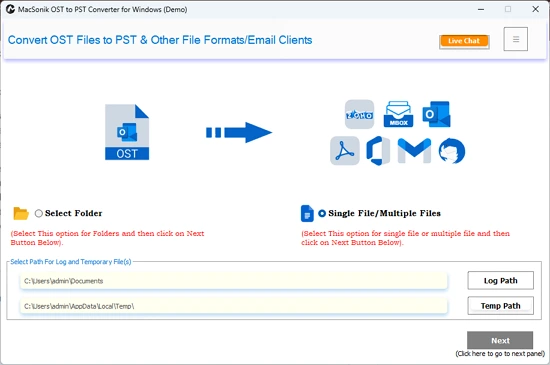
To perform a speedy, risk-free, and hassle-free conversion of OST emails into Word DOC, use the MacSonik OST Converter Tool. This all-in-one software enables you to convert bulk OST emails to the DOC format in a single go without any loss of data structure or formatting. Additionally, its easy-to-use interface simplifies the process, and you can use any advanced filter options for customization. Moreover, it has a Demo Version that allows you to free convert upto 50 emails per folder and check the software’s performance and functionalities.
Steps to Convert OST to Word Document
- Launch the OST to DOC Converter and click Next.
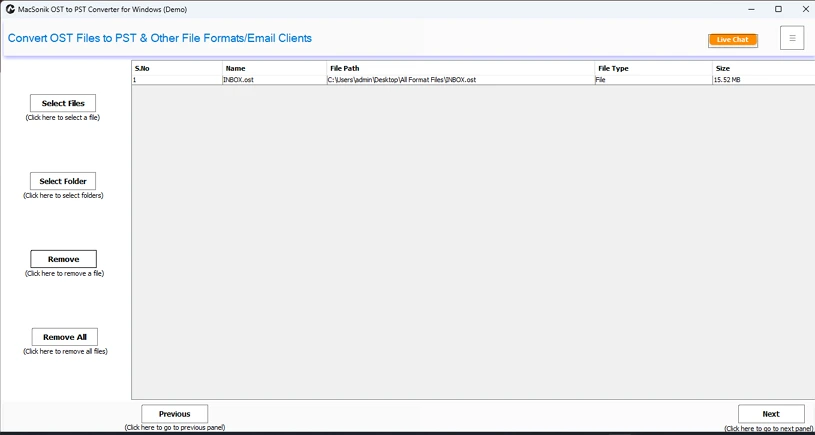
- Then, add the files and folders in .ost format and click Next to proceed.
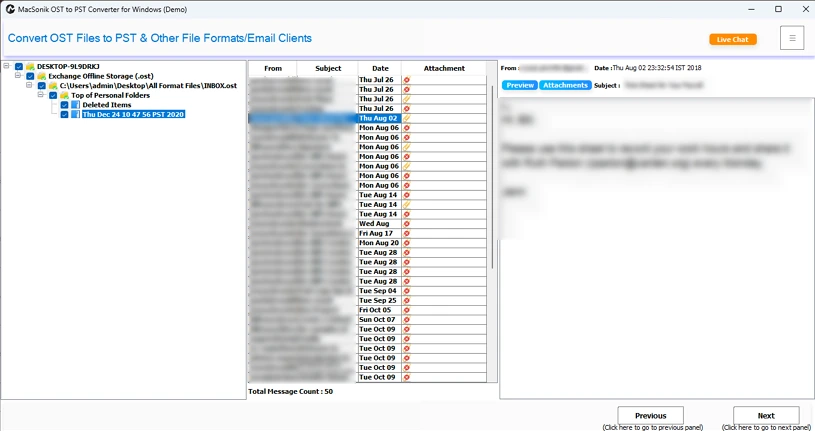
- Further, preview the emails and select those to convert. Click Next.
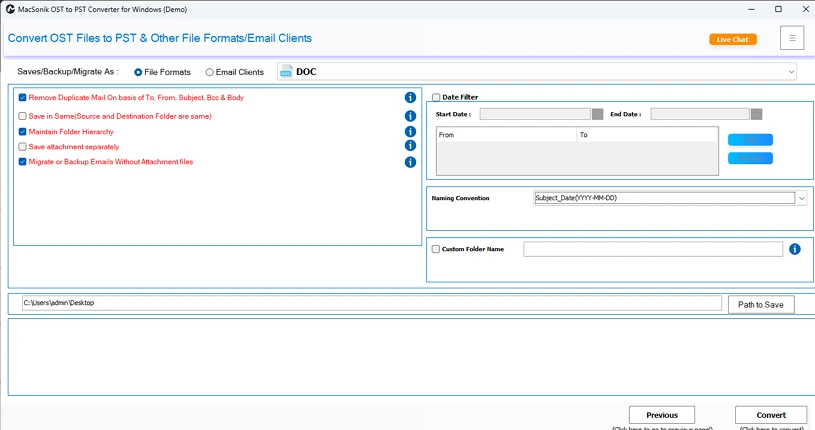
- Afterward, select DOC format from the options, apply filters, pick a destination, and click Convert.
Key Benefits of Using the OST File Conversion Tool
|
One-Time Conversion MacSonik offers a One-Time Service where our experts take care of the process and convert OST file to DOC. You do not need to install the software. |
Money-Back Guarantee Provides a 30-day money-back guarantee in case of any failures. Read the complete policy, or reach our expert support 24*7 for more details on the same. |
Multiple Saving Options Other than DOC, you can use this excellent software to convert OST file to CSV, EML, PST, and many other file formats and email clients. |
Conclusion
Convert OST to DOC makes your email data accessible, editable, and easier to use for presentations and reviews. The manual process is suitable if you want to convert a few OST files, but if you have multiple files with large email attachments, then using the professional converter tool is the most reliable option. Once converted to DOC, you can easily use them anywhere without difficulties.
Frequently Asked Questions
Ans. To save data without Outlook, simply use the OST to Word Converter and complete the process in minimal time without loss.
Ans. The best way is to download and convert with the OST Converter that can handle many OSTs and keeps everything intact as in the original file.
Ans. The manual methods may take long hours to complete the conversion, as you can only save them one by one. Whereas the same process, if done using the expert too,l will be completed in no time.
Ans. Yes, of course. The OST to PST Converter Tool has the DOC saving option and allows you to save emails in bulk, despite their size or number.
Related Post
