Learn How to Convert ICS To EML? Easy Steps


User Query: “I have multiple calendar invitation files saved in ICS format, and now I need to access them as email messages in EML format. I want a reliable way to convert my ICS to EML while keeping event details or attachments safe. What is the easiest solution?”
– Alina Stark
Summary: Digital calendar files are commonly used for sharing meeting invites, schedules, and events. However, ICS files are not always helpful when users want to store or access them as individual email messages. Therefore, many email clients prefer the EML format because it stores messages offline and keeps all metadata intact. In this blog, we explain how to convert ICS to EML using trusted methods while keeping data safe. Moreover, the professional MacSonik ICS Converter Tool provides safe conversion while preserving event details, formatting, and attachments.
Understanding the Changes When You Export ICS to EML
The table below shows why many users prefer to export their ICS to EML format.
|
Point of Comparison |
ICS Files |
EML Files |
|
File Type |
Calendar event file |
Individual email message |
|
Accessibility |
Requires calendar apps |
Opens in Outlook, Thunderbird, Apple Mail |
|
Offline Access |
Limited |
Fully accessible offline |
|
Attachments |
Event-based |
Stored within the email structure |
|
Sharing |
Calendar dependent |
Easy to share as a single file |
|
Archiving |
Not ideal for backup |
Perfect for long-term storage |
This overview highlights why converting ICS to EML improves accessibility, sharing, and long-term storage.
Manual Methods to Convert ICS to EML
Below are some basic manual methods to change your ICS to EML format. These methods may work for small requirements.
Method 1: Change ICS to EML Using an Email Client
You can use an email client that supports ICS files. Hence, follow the steps given below:
- First, open the Outlook email client on your system.
- After that, drag and drop the required ICS file into the email client.
- Then, open the event that you want to save as an email message.
- Further, choose Save As and select EML format as output.
- Finally, save the file on your system locally.
Method 2: Copy Event Details to Convert ICS files to EML
Another approach is to copy event information manually. The steps for effective conversion are given below:
- First, open the ICS file using any calendar application.
- After that, copy the event details from the ICS file.
- Then, paste the content into a new email draft.
- At last, save the email as an EML file.
Limitations of Manual Methods
- Manual methods cannot change ICS files to EML in bulk
- All the attachments may not be preserved properly
- Event metadata, like organizer and timestamps, may change
- There is no option to filter files by date
- Along with being time-consuming and prone to errors
- Lastly, they are not suitable for professional or large-scale conversion
Professional Method to Convert ICS to EML
If you want a safe, fast, and accurate conversion, the Emaildiver ICS Converter Tool is the best choice. Since the tool is specially designed to transfer ICS files to other formats, it keeps every event information intact. Moreover, the tool supports bulk conversion, preserves attachments, and keeps all calendar details intact. Also, it allows users to transfer ICS files to EML according to a specific date range, making the process more flexible and efficient. Additionally, the tool maintains complete data security and does not modify original files during conversion.
Professional Steps to Export ICS to EML Files
Follow the steps below to change ICS files to EML using the professional solution:
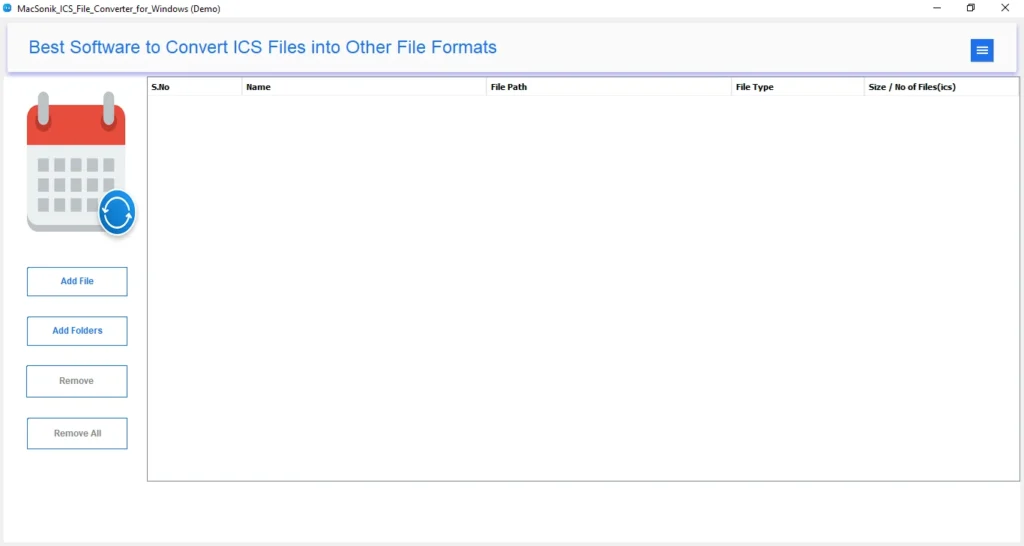
- First, download and launch the ICS Converter Tool on your system.
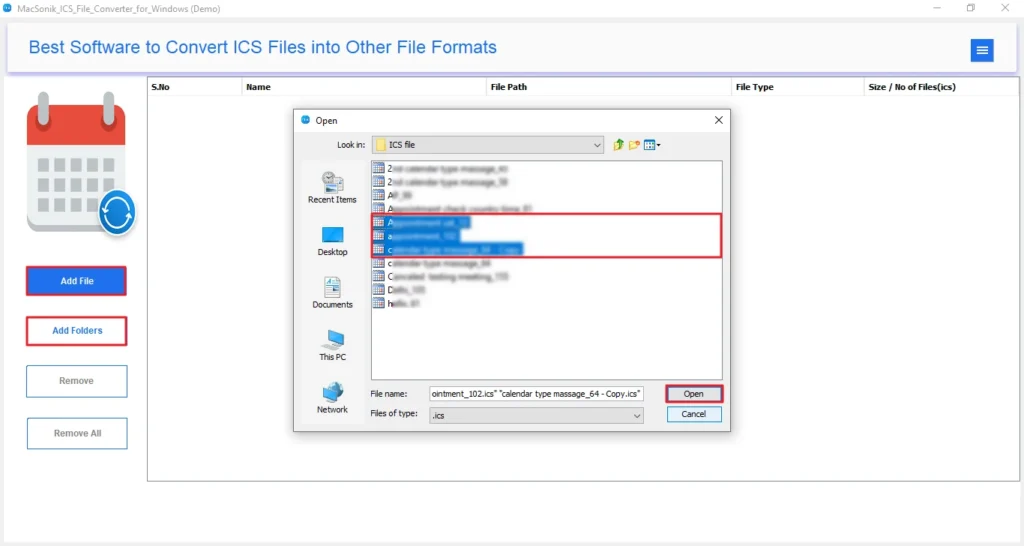
- After that, click Add Files or Add Folders to browse and open your ICS files or folders, and click Next.
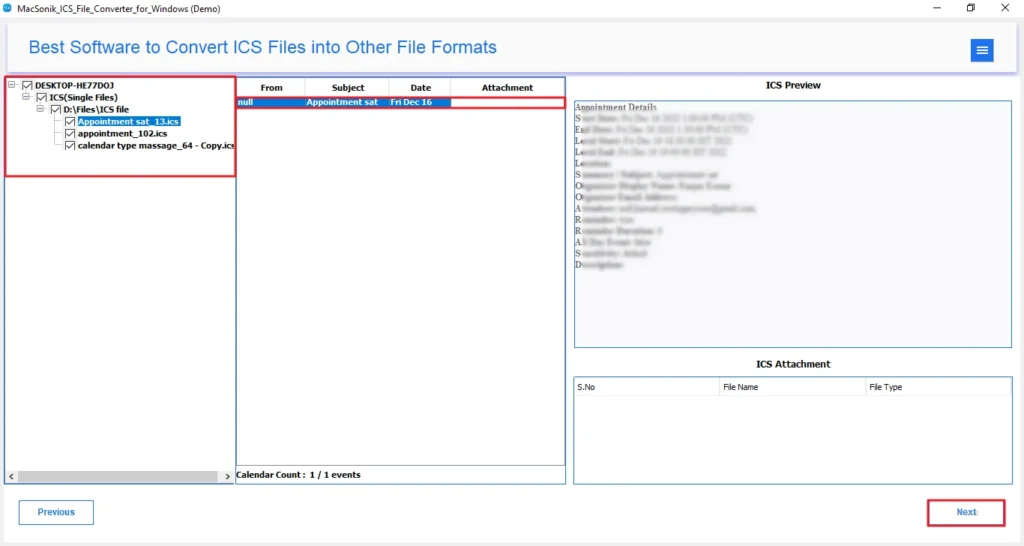
- Then, select files or folders from the tree structure, preview the loaded calendar events, and click Next.
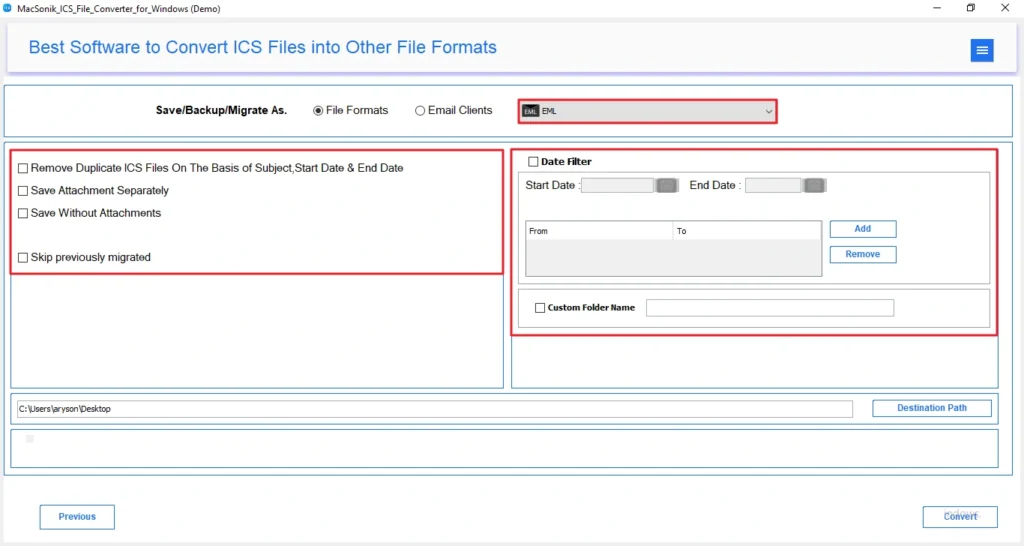
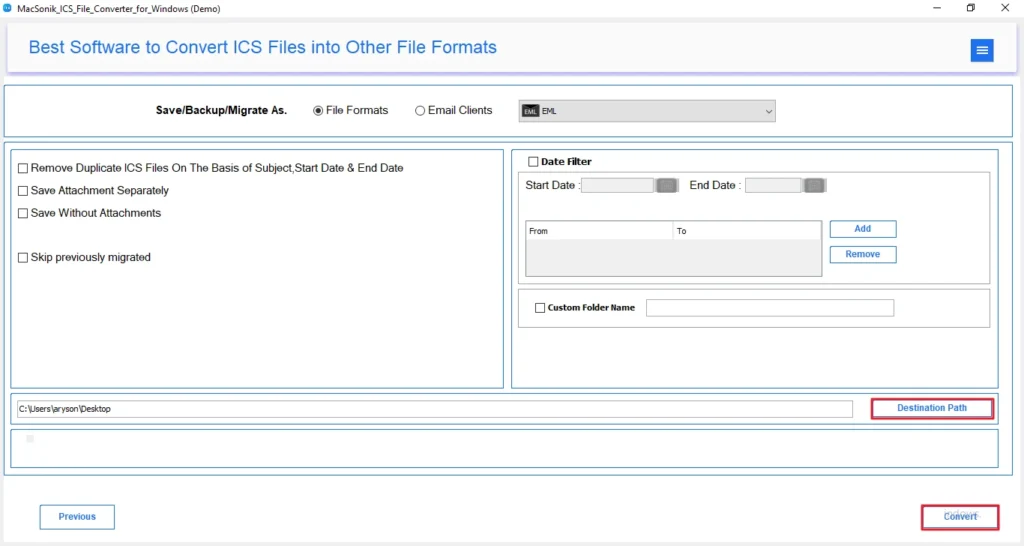
- Further, choose EML as the output file format and apply advanced filters if required.
- Finally, select the destination path and click Convert to start the export process.
Conclusion
To sum up, in this blog, we have discussed the best methods to convert ICS to EML format. ICS files are mainly used for calendar events, but they are not always suitable for email storage or archiving. Hence, conversion of ICS to EML allows users to store events as individual email messages for easy accessibility and sharing. While manual methods may help with a few files, they are not reliable for bulk or accurate conversion. Therefore, for users who want 100% accurate bulk conversion, the MacSonik ICS to EML Converter is the most reliable solution.
Frequently Asked Questions
Q1. What is the most reliable method to transfer ICS files to EML in bulk?
Q2. Is it possible to export the ICS to EML files according to a specific date?
Q3. How to convert ICS to EML with attachments?
Q4. How do I change ICS to EML format with 100% accuracy?
Related Post
