How to Convert PST to VCF Files in Bulk? Easy Approach


User Query: I need to share some contacts with outside partners, but those people don’t use Outlook. The contacts are in a PST file, which isn’t exactly the most shareable format. The easiest fix is to convert those contacts to VCF, since pretty much every email app can open that without any issues.
Summary: PST files are fine when you’re working inside Outlook, but the moment you need to share contacts with someone outside your organization, things get a bit difficult. VCF, or vCard format, is just a much more practical option here. It works with Gmail, Apple Mail, and most other email clients without any extra steps. In this blog, we’ll go through a few different ways to convert PST to VCF. It includes the manual method and the advanced MacSonik PST Converter Tool.
Simple Reasons to Convert PST file to VCF
- VCF files work with almost every email app, so sharing contacts becomes much less complicated.
- Not everyone uses Outlook, and VCF makes sure your contacts are readable for everyone else.
- Sending a VCF file is simple and quick compared to dealing with a bulky PST file.
- VCF files are lightweight and easy to store without taking up too much space on your device.
- You can import VCF contacts into Gmail, Apple Mail, or Android phones.
- VCF keeps all contact details like phone numbers, emails, and addresses in one place.
How We Can Convert PST to VCF Manually?
This approach lets you convert PST contacts into VCF format one at a time. Before you begin, make sure your PST file is already added to Microsoft Outlook.
Steps to Convert Outlook PST to VCF
- Open Outlook on your system.
- Go to the People (Contacts) section to access your address book.
- Select the contact you want to export.
- Click on File and choose Save As.
- In the Save As window, pick your desired location and select vCard Files (*.vcf) as the file type.
- Finally, click Save to convert PST to vCard.
Limitations
- Exports only one contact at a time
- Takes a lot of time for large contact lists
- Requires Microsoft Outlook installation and setup
- May not preserve all contact details, like notes or images
- Needs repeated manual effort for each contact
Secure Way to Convert PST to VCF in Bulk
If you have a large number of PST contacts to convert, doing it manually can take forever. The PST Converter Tool makes that process a lot faster; it converts the PST files to VCF format and also supports a few other output formats. On top of that, it can convert PST to HTML and other file formats. The tool lets you import multiple files at once instead of going one by one. There are some task filters available if you want to narrow down what gets converted. Moreover, you can use this reference to convert PST to TXT.
Steps to Convert PST Contacts to VCF
- Download the PST Converter Tool.
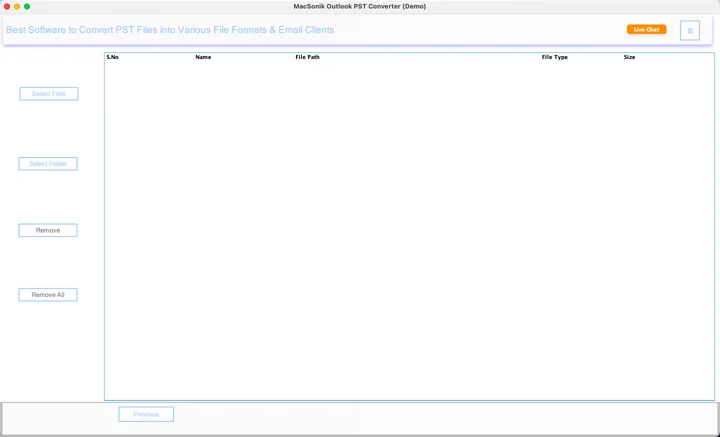
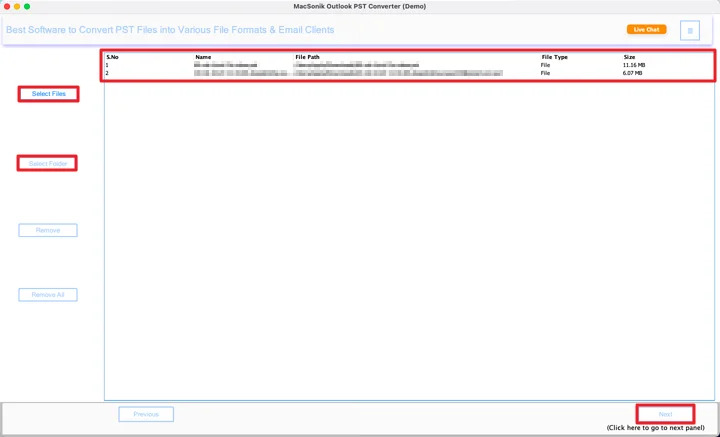
- Add the PST files and click the Next button.
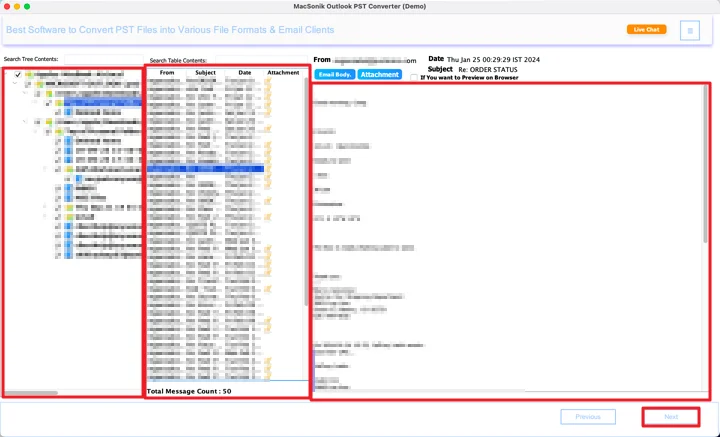
- Preview and select files, and click the Next button.
- Now, choose the VCF file format from the list.
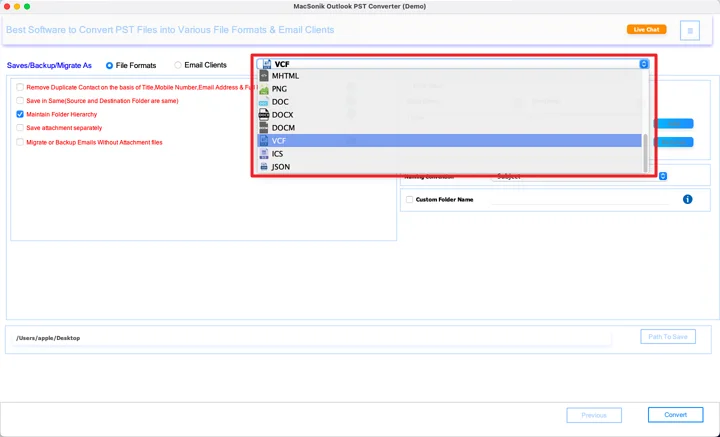
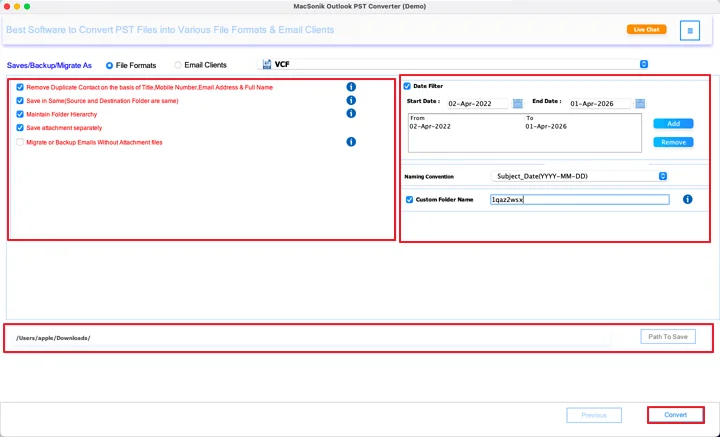
- Lastly, apply the filters, set the path, and click Convert.
Conclusion
Converting PST contacts to VCF is honestly not that hard once you pick the right method for your situation. If you only have limited contacts to convert PST to VCF, the manual way works fine. But if you’re dealing with a large PST file or need to convert contacts in bulk. The PST Converter Tool saves you a lot of time and frustration.
Frequently Asked Questions
Ans: Yes, you can use the PST Converter Tool to convert PST files to VCF without installing Microsoft Outlook, making the process quicker and more convenient.
Ans: Manual methods may risk missing some details, but using the PST Converter Tool ensures a safe conversion process without altering or losing contact data.
Ans: Manual conversion may skip some fields like notes or images, whereas the PST Converter Tool preserves complete contact details during the conversion process.
Ans: For a few contacts, the manual method in Microsoft Outlook works fine, but for bulk conversion, the PST Converter Tool is faster and more reliable.
Ans: Yes, the PST Converter Tool offers options to handle duplicates, helping you convert unique contacts and avoid repeated entries in the final VCF files.
Related Post
